Templates
AI Tiny Desk Video Generator: Photo to Live Rap Performance
This is the dedicated AI Tiny Desk template: upload one clear portrait for each labelled performer role and render a short live-band performance using a fixed stage, band movement and soundtrack.
- Five labelled performer roles
- 19-second live-band staging and camera movement
- Ready-to-post vertical MP4
Create your video
1Role photos
0/5Use one clear, front-facing portrait for each role. Keep the head and shoulders visible and avoid masks, heavy filters and faces covered by hands.
2Format
Original: Charlie Wilson, NPR Music Tiny Desk Concert. AI versions are community-made samples, not output of this site.
How it works
How to make an AI Tiny Desk concert video
- 01
Prepare the role portraits
Use a clear, front-facing photo for each labelled adult role. Keep the head and shoulders visible and avoid masks, heavy filters and faces covered by hands.
- 02
Start the Tiny Desk template
Use the fixed 19-second live-band format shown on this page. The stage, camera movement and soundtrack are supplied by the template; you do not need to film a band or edit a timeline.
- 03
Review the complete performance
Before posting, watch the whole clip for identity, hands, mouth timing, background instruments and audio. Failed renders return their credits automatically.
Made with Image to Rap Video
Role photos in, one live-band rap clip out
No camera crew and no editing timeline. Upload the requested performer portraits and the model follows the 19-second performance template's motion, framing and audio.
Generated clip
What is the AI Tiny Desk concert trend?
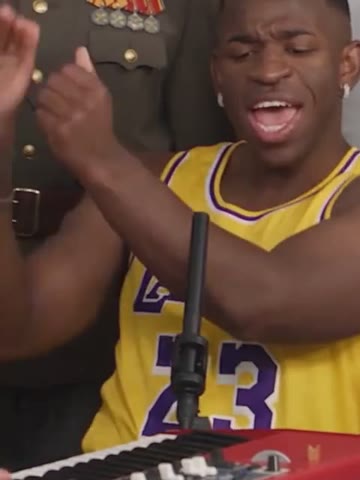
AI Tiny Desk videos borrow the close, unpolished energy of a small-room live session: shelves or records behind the performers, a microphone in the foreground, a live band, and a vocal performance that feels like part of the room.
The format became recognizable through short clips built around soul, funk and rap performances. AI versions usually keep that visual language while changing the performer. Some tools create a completely new room; others use a fixed performance video as a motion and timing reference.
On Image to Rap Video, this page is a dedicated AI Tiny Desk style rather than the generic Hotel Lobby or orange-studio template. The current render uses a fixed 19-second source and does not accept a custom song, cloned voice or separately uploaded lyrics.
The samples on this page are community trend clips, not customer output from this site. They show the creative direction; they are not a promise that every face, instrument and camera frame will be preserved identically in a new generation.
What this Tiny Desk template includes
Live-band staging
The template already contains the room, band positions, cameras and stage movement, so the input starts with a performance rather than an empty prompt.
Role-based photo mapping
Each labelled slot maps a portrait to a specific performer position, reducing ambiguity about who should appear where.
19-second vertical format
The output is built for TikTok, Reels and Shorts. One fixed length keeps the price and user expectations easier to understand.
Recognizable soundtrack
The template carries the performance audio. This version does not upload a separate MP3 or clone a real singer’s voice.
Consent-first workflow
Only adults with permission should be uploaded. Celebrities, public figures and non-consensual likenesses are not allowed.
Failed-render protection
If the provider cannot produce a video, the reserved site credits are returned automatically.
What people use a Tiny Desk-style video for
A lead-singer entrance
Use the lead role for a profile, group chat or creator introduction while the other slots preserve the full-band scene.
A duet or band joke
Use the performer slots shown in the generator to make a private joke with friends while the live-band scene supplies the atmosphere.
A music-culture post
Use the familiar desk-session visual language for a reaction, fan edit or short-form music post without booking a studio.
Shoot a live session vs. use the Tiny Desk template
| Shoot it yourself | Use this template |
|---|---|
| Find a room, band, microphones and lighting | Start with the fixed live-session scene |
| Direct several performers and multiple camera angles | The template supplies the stage and camera movement |
| Record and mix the performance audio | The fixed soundtrack is already part of the format |
| Edit a vertical clip for social platforms | Download a 19-second vertical MP4 |
Questions, answered
AI Tiny Desk Concert
Turn role photos into a live-band rap performance.
Contact supportWhat is the AI Tiny Desk template?+
It is a fixed live-band performance template. Your portrait supplies the performer while the stage, camera movement and audio come from the template.
Is this affiliated with NPR Tiny Desk?+
No. Image to Rap Video is an independent product and is not affiliated with NPR, Tiny Desk or the performers in the original trend clips.
Can I put myself into the original Outstanding clip?+
The current template is a fixed photo-led performance workflow. It does not promise a frame-by-frame edit of the original concert, and community samples are not proof that every original detail will be reproduced.
Can I upload a custom song or lyrics?+
Not in this template. The current render uses the fixed soundtrack and does not accept a separate song, lyrics or voice-cloning file.
What photos work best?+
Use one clear, well-lit portrait for each labelled role, with the head and shoulders visible, no masks and no heavy filters.
Will other people in the template be replaced?+
The current Tiny Desk layout exposes five performer roles. The same adult may be reused in several slots, or five consenting adults can be mapped to different roles.
What happens if the render fails?+
The credits reserved for a failed render return to your account automatically. You can retry with a clearer photo or a different input.
Pricing
Pay once, use whenever
Each 19-second video costs 19 credits. Buy a one-time pack; no subscription and no expiry.
Starter
One 19-second video
$9.90
19 credits
Makes 1 × 19s video
- Credits never expire
- 19-second vertical video
- HD MP4 download, no watermark
- Automatic refund on failed renders
Creator
Three 19-second videos
$19.90
57 credits
Makes 3 × 19s videos
- Credits never expire
- 19-second vertical video
- HD MP4 download, no watermark
- Automatic refund on failed renders
Studio
Six 19-second videos
$29.90
114 credits
Makes 6 × 19s videos
- Credits never expire
- 19-second vertical video
- HD MP4 download, no watermark
- Automatic refund on failed renders
Prices in USD. Taxes are calculated at checkout by our payment partner.
Turn the role portraits into a short rap-performance video
Upload a clear photo for each role, generate a 19-second vertical video and download the MP4.
Create my rap video